
Collections
The Collections template displays a list of products that belong to a selected collection. It provides customers with an easy way to browse, filter, and sort products.
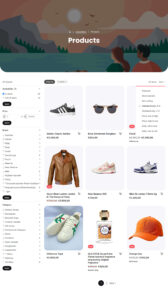
Collection banner
The collection banner section is available on the Collections template.
| Settings | Default | Description |
|---|---|---|
| Layout | ||
| Height | Deault | Sets the height of collection banner. Yoin pu ca choose default height or custom height in percentage. |
| Background | None | Sets the section background style. Options: None, Solid, or Gradient. |
| Radius | 48px | The curved radius for the bottom part of collection banner. |
| Mobile radius | 24px | The curved radius for mobile screens for the bottom part of collection banner. |
The collection banner accepts all theme blocks. You can use images (set as background), video (set as background) and heading (dynamic collection title) example below.

Faceted Sidebar
The faceted sidebar helps customers quickly find the products they are looking for by applying filters.
Customers can:
- Apply one or more filters
- Clear individual filters
- Clear all active filters with a single click
The available filters include:
- Availablity
- Price
- Brand
- Category
Additional filter options may be added in future updates.
Item count
The item count displays the total number of products available in the current collection.
Hovering over the item count displays additional information, such as:
Showing 1–21 of 26 items
Product Sorting
Customers can sort products using the following options:
- Featured (Manual)
- Most relevent
- Best selling
- Alphabetically, A-Z
- Alphabetically, Z-A
- Price, low to high
- Price, high to low
- Date, old to new
- Date, new to old
Product grid
Products are displayed in a responsive grid layout that automatically adapts to different screen sizes.
Each product is displayed using a reusable Product Card component to maintain a consistent design throughout the store.
The product card includes:
- product image
- product title
- product price
- quick add to cart
Pagination
Pagination is provided to help customers navigate through collections containing a large number of products.