
Bento
The Bento section is inspired by the traditional Japanese bento box, featuring a flexible grid layout that allows you to create visually engaging content arrangements. By combining different block sizes and content types, you can build unique promotional areas, feature highlights, and campaign sections.
By default, the section includes the following blocks:
- Image box
- Countdown box
You can add multiple blocks of each type and rearrange them in any order to create the layout that best suits your content.
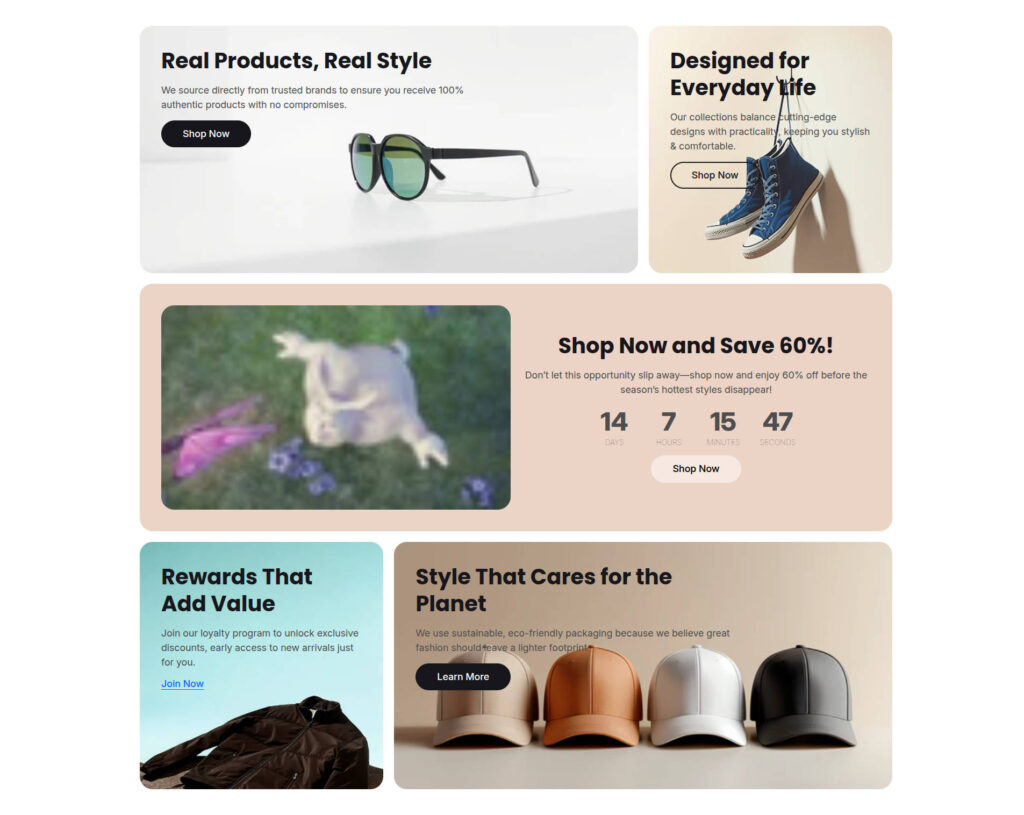
Section Settings
| Settings | Default | Description |
|---|---|---|
| Layout | ||
| Padding top | 48px | Sets the spacing above the section |
| Padding bottom | 48px | Sets the spacing below the section |
| Box | ||
| Box radius | 24px | Sets the border radius for each block |
| Box height | 460px | Sets the height of each block |
Block settings
Image box
| Settings | Default | Description |
|---|---|---|
| Box span | 6 | Controls the width of the block within a 12-column grid. A value of 6 occupies half the available width. Increase or decrease this value to adjust the block size |
| Image | None | Select the image displayed within the block |
| Heading | Heading | Sets the heading displayed on the block |
| Description | Description | Sets the descriptive text displayed below the heading |
| Button label | Shop Now | Sets the text displayed on the button |
| Button link | None | Sets the destination URL for the button |
| Button type | Primary | Select the button style: Primary, Outline, Accent, Light, Link |
Countdown box
| Settings | Default | Description |
|---|---|---|
| Box span | 6 | Controls the width of the block within a 12-column grid. A value of 6 occupies half the available width. Increase or decrease this value to adjust the block size. |
| Media | None | Optionally display an image or video within the block. This setting can also be left empty. |
| Heading | Heading | Sets the heading displayed on the block |
| Description | Description | Sets the descriptive text displayed below the heading |
| Date | None | Sets the target date and time for the countdown. The date must be at least one day in the future and no more than 15 days from the current date |
| Button label | Shop Now | Sets the text displayed on the button |
| Button link | None | Sets the destination URL for the button |
| Button type | Primary | Select the button style: Primary, Outline, Accent, Light, Link |