Footer
This is theme header and is reused through out the website.
By default, the header section includes the following blocks:
- Brand information
- Menu
- Text
- Image
You can add multiple blocks of each type and rearrange them in any order to create the layout that best suits your site header.

Footer Settings
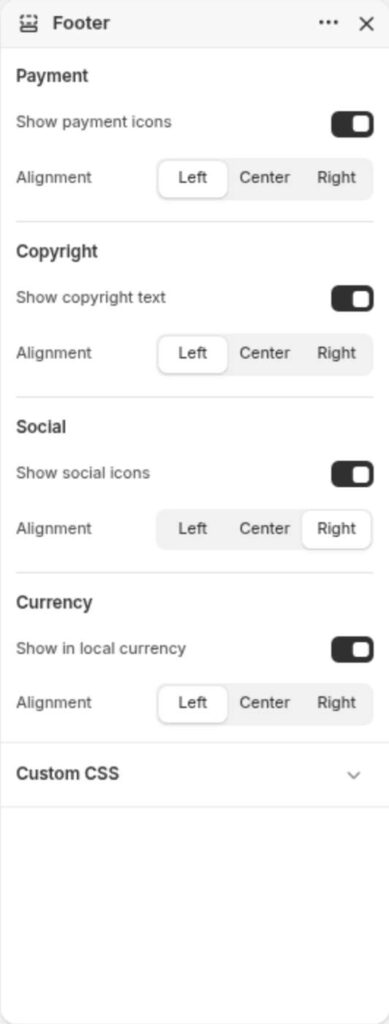
| Settings | Default | Description |
|---|
| Payment | | |
| Show payment icons | True | Displays the payment icons. The payment types are based on the store’s enabled payment providers and the customer’s current region and currency. |
| Alignment | Left | Aligns the block block based on settings |
| Copyright | | |
| Show copyright text | True | Shows the copyright text |
| Alignment | Left | Aligns the block block based on settings |
| Social | | |
| Show social icons | True | Shows the social icons block |
| Alignment | Left | Aligns the block block based on settings |
| Currency switcher | | |
| Show in local currency | True | Shows the currency switcher block |
| Alignment | Left | Aligns the block block based on settings |
Block Settings
Brand information
| Settings | Default | Description |
|---|
| Shop logo | True | Displays the shop logo. See managing your brand assets. |
| Shop name | False | Displays the shop name |
| Shop slogan | False | Displays the shop slogan |
| Shop description | True | Displays the shop description. |
Menu
| Settings | Default | Description |
|---|
| Menu | footer | Show menus like Privacy, Support |
| Alignment | Left | Aligns the block block based on settings |
Text
| Settings | Default | Description |
|---|
| Heading | Heading | Any heading you want to show that is not available as block |
| Subheading | Subheading | Any paragraph text |
| Alignment | Left | Aligns the block block based on settings |
Image
| Settings | Default | Description |
|---|
| Image | None | Displays the input image. e.g.secure lock icon |
| Alignment | Left | Aligns the block block based on settings |
